Interesting Tech Projects
Mapping
50,000 Point GPS Track in Silverlight
Mar 1st
About six months ago I posted a video showing a GPS track with 7,000 points in a slippy map control called DeepEarth. If you watch the video you can see that the track lags behind the map a little and I think I was at the limit of what was usable.
Yesterday I wrote about my new C# based slippy map control for Silverlight and Moonlight that can display 50,000 map markers and I wanted to see what it’s performance was like for a GPS track. I created a random track with 50,000 points in it to simulate a track from a GPS unit. Here is the result. More >
50,000 Map Markers in Silverlight
Feb 28th
There are a range of pan and zoom map controls (sometimes called slippy maps) available for C#/.NET and Silverlight/Moonlight. All the ones I’ve seen have something in common – they are bloated. The authors attempt to address the needs of as many users as possible and the result is large downloads and far too many features. The forums and mailing lists are full of people asking how to achieve basic functionality because they are lost in the vast realm of classes.
Of course, it is possible to remove what you don’t need but that requires understanding the code and after all that effort you are left with code that might not have the right license for your needs. The solution? Time to cringe – reinventing the wheel.
Fortunately it’s not much of a wheel, assuming your requirements are simple as mine are. C# and good development tools (Visual Studio and MonoDevelop) makes it easy to quickly develop a lightweight and flexible slippy map that can be used in Windows, Mac OS X and Linux (using Moonlight). More >

Poster Map of East Yorkshire
Jan 19th
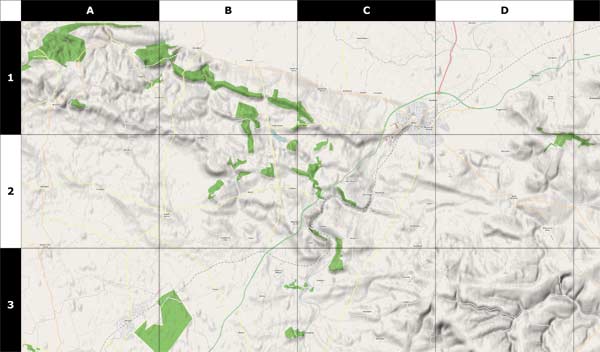
Using data from the OpenStreetMap project (taken a couple of days ago) along with some utilities such as Maperitive and custom software, I have generated a 39 inch x 31 inch poster of the East Riding of Yorkshire. This map includes hillshading and contour lines and individual streets can be seen.
Some assembly is required. Print it out on A4 paper, cut out the sheets and then glue them together. Download it here.
Here is a sample:

So You Want to be a Cartographer?
Jan 16th
Love maps? Want to make your own? Now it’s easy thanks to a set of free software.
Previously I wrote about the OpenStreetMap project, which allows anyone to edit a map of the world. People can add points, lines and areas and “tag” them to show what they are. Once the data is uploaded a new version of the map is generated for everyone to see.
For example I could create a point on the map and tag it with “railway=station” to indicate that it is a train station. I could draw a line and tag it with “highway=residential” to mark the line as a residential road. I could also draw an enclosed area and tag it with “landuse=forest” to show that the area is a forest. There are many different tags that can be used to represent all kinds of things that appear on maps.
This article is in the form of a tutorial to get you quickly started creating your own maps. I will introduce the software involved and show how to use it step by step. The result of the tutorial is a map of the North Yorkshire Moors Railway, which is a steam train service on a historic train line in England and is featured in the Harry Potter films.
Optimizing DeepEarth For GIS Mapping
Sep 5th
DeepEarth is an interesting Silverlight project. It allows interactive tile-based maps to run in a browser with overlays of custom data, however it suffers from some performance problems.
Large GPS Track Logs
I had the need to display GPS tracks in DeepEarth. GPS tracks can contain thousands of points. DeepEarth has three update modes called ElementUpdate, PanOnlyUpdate and TransformUpdate for showing features such as tracks:
- ElementUpdate recalculates the point positions on every map movement. This produces an accurate track display but gets slower as the number of points increases.
- PanOnlyUpdate recalculates point positions during panning and hides features while zooming. Not too useful for me and didn’t seem to show anything anyway.
- TransformUpdate draws the tracks to the map once then scales and pans the vector graphic in synchronization with the map. This makes it very fast. Sadly the scaling code is flawed. Lines disappear as you zoom in and sections of the tracks become distorted, almost looking like calligraphy.
I wasted many evenings trying to get the scaling in TransformUpdate mode working before giving up. I then turned my attention back to the ElementUpdate mode to see where the bottleneck is. More >
Compiling OpenScales 1.1 with FlashDevelop 3
Feb 7th
This article describes how to compile the OpenScales mapping library for Flash in FlashDevelop 3. OpenScales is an open source LGPL library for displaying interactive maps using Flex and Actionscript. It has many of the features of OpenLayers. FlashDevelop 3 is a free Flash development environment and can be used with the Flex SDK from Adobe.
This article assumes you already have the Flex 3 SDK and FlashDevelop 3 installed and working. See my post from two years ago for help. More >
Map Scales and Printing with Mapnik
Sep 22nd
Mapnik is a nice open source library for generating maps. The typical data source is OpenStreetMap style data stored in a PostgreSQL/PostGIS database. This post examines how to understand and control the map scale and generate maps suitable for printing.
Map Scales
A map scale looks something like 1:1000. This means that for every 1 inch on the map there are 1000 inches in the real world. The units don’t matter, for example it also means that 1 meter on the map is 1000 meters in the real world. The value 1000 shown in this example is called the Scale Denominator.
Maps (in the context of this discussion) are generated using pixels. This is true even if printing because ultimately the printer has to print the pixels onto the paper (assuming a raster output). At low resolutions the pixels will be easily seen. Not so at high resolutions.
It is therefore useful for us to know the size of a pixel in meters. If we know this then we can work out the map scale and set the map scale. More >
OpenStreetMap and Beaches of the Rich and Famous
Sep 1st
In Malibu, Calif. there have long been disputes between the rich and famous and the public over access to certain beaches. One of these is Trancas Beach (a.k.a. Broad Beach).
In the 100 or so houses along this beach are the homes of some of the most famous people in Hollywood. Under the California Constitution (Article X, Section 4) the public is allowed access to certain areas of beach, but the rich and famous apparently want to keep it all for themselves. They even bulldozed the sand to protect their homes but ruined the public section, before being made to undo the damage.
This beach has two public access walkways, but they can be hard to find. They are located between houses and are narrow. According to some reports the local residents try to obsure the locations and put up false signs to deter people.
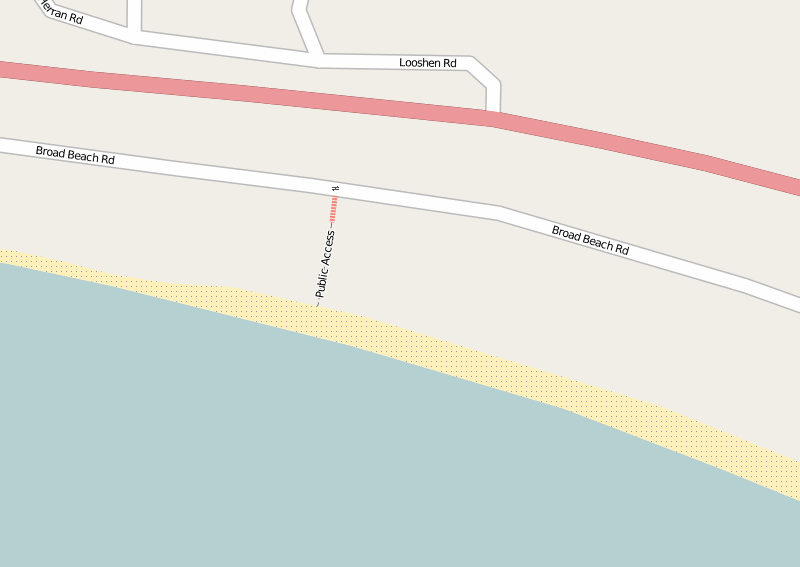
Last weekend (August 2009) I went to the beach armed with my GPS unit. I recorded the western public access and I have now added it to OpenStreetMap. Within a few minutes it was rendered (showing the location, steps and the gate).
Now everyone will be able to put this onto their maps and GPS units, easily find this public access point and enjoy free parking and a quiet beach!
Twitter + Google Maps + Text Messaging Mashup
Aug 16th
I am planning a road trip and thought about using Twitter to send updates from the road. As my phone doesn’t have internet access and emailing using the Samsung interface is difficult, I would be restricted to text messaging. However I really wanted a way to post tweets with a link to a map showing my approximate location. Ideally it would allow vague descriptions such as “Euclid and Stone, Tucson” as well as latitude and longitude, e.g. “N 32. 16.123 W 110 18.654”.
Surprisingly a search turned up very few options. There is, however, a service that already does everything I want, and it’s called Geo.ly. So why not use it I hear you ask? Well there are two large problems. Firstly the twitter interface doesn’t seem to be working right now and appears to have reliability problems. Secondly about 20% of the time the service will give you a URL to a map that doesn’t work – all you see is a blank page.
After a bit more fruitless searching I sat down and wrote my own PHP code that pulls everything together. Here is how it works.
There is a free text messaging service called TextMarks that converts text messaging to/from HTTP requests and responses. All that’s needed to send and receive text messages is to write a PHP (or CGI) script and put it on a web server somewhere. I tried it and it really is a piece of cake.
Next was to convert the text description of a location into latitude and longitude. For this Google provides a free geocoding system, providing that the results are shown on a Google map. After a bit more work I had this working and it can accept a wide variety of input descriptions. For example the ones I listed above plus things like “Grand Canyon National Park”. Perfect.
The final piece of the puzzle was to automatically post the tweet with the location of the Google map using the Twitter API. I found that Twitter automatically shortens URLs in tweets using the bit.ly service.
So now I can send a text message with a rough description of my location, the location is converted to coordinates, a tweet is generated with a link to the map and a confirmation text message is sent back to my phone. This typically takes about 15 seconds. Nice!
Below is the PHP script. Use at your own risk. To install:
- Copy to somewhere on your webserver
- Go to TextMarks and create a new TextMark for your service
- Create a TextMarks account and edit the configuration. Disable messaging and any public options for your TextMark – after all you don’t want other people posting locations to your twitter account.
- Edit the script and enter your Twitter username and password. Also enter your Google Maps API key (which is free).
Note that there is no authentication used in the script. This is because the script is not linked to, uses an obscure name (not twitter.php, which is just an example name), and the TextMark is private. However, if desired, the TextMarks service can pass the phone number to the script allowing for only specific phones to use the system.
A public version would, of course, need more input checking, user authentication, etc.
<?php

// script to take a location description from a text message,

// generate a URL to a map and then tweet the URL

// the result is returned as a text message
// (C) Copyright Andrew Ayre, 2009

// andy at britishideas dot com
// call from TextMarks using something like:

// http://www.mydomain.com/twitter.php?args=\0
// This program is free software; you can redistribute it and/or

// modify it under the terms of the GNU General Public License

// as published by the Free Software Foundation; either version 2

// of the License, or (at your option) any later version.
// This program is distributed in the hope that it will be useful,

// but WITHOUT ANY WARRANTY; without even the implied warranty of

// MERCHANTABILITY or FITNESS FOR A PARTICULAR PURPOSE.  See the

// GNU General Public License for more details.

// You should have received a copy of the GNU General Public License

// along with this program; if not, write to the Free Software

// Foundation, Inc., 51 Franklin Street, Fifth Floor, Boston, MA  02110-1301, USA.

// See: http://www.gnu.org/licenses/gpl-2.0.html
// twitter username and password

$twitter_username = 'myusername';

$twitter_password = 'mypassword';

// API key for Google Maps

$google_mapsapikey = 'myapikey';
// max time to wait for tweet responses from twitter in seconds

$twitter_timeout = 30;

// max time to wait for Google geocoding service in seconds

$google_timeout = 30;
// get text message contents

$args = $_GET['args'];

// encode

$args = urlencode($args);
// geocode input

$req = curl_init("http://maps.google.com/maps/geo?q=$args&output=json&oe=utf8&sensor=false&key=$google_mapsapikey");

curl_setopt($req, CURLOPT_RETURNTRANSFER, true);

curl_setopt($req, CURLOPT_CONNECTTIMEOUT, $google_timeout);

$output = curl_exec($req);

curl_close($req);
// parse geocoding result

$result = json_decode($output, true);

if ($result == NULL) {

echo "Geocoding failed";

return;

}
// get address and coordinates

$address = $result['Placemark'][0]['address'];

$lon = $result['Placemark'][0]['Point']['coordinates'][0];

$lat = $result['Placemark'][0]['Point']['coordinates'][1];
// construct Google URL

$mapurl = urlencode("http://maps.google.com/maps?q=$lat+$lon&mrt=yp");
// send to twitter - based on

// http://morethanseven.net/2007/01/20/posting-to-twitter-using-php/

$tweet = "I am somewhere near $mapurl";

$req = curl_init('https://twitter.com/statuses/update.xml');

curl_setopt($req, CURLOPT_CONNECTTIMEOUT, $twitter_timeout);

curl_setopt($req, CURLOPT_RETURNTRANSFER, true);

curl_setopt($req, CURLOPT_POST, true);

curl_setopt($req, CURLOPT_POSTFIELDS, "status=$tweet");

curl_setopt($req, CURLOPT_USERPWD, "$twitter_username:$twitter_password");

$output = curl_exec($req);

curl_close($req);
// return result via text message

if (empty($output))

{

echo "Failed: $address, $lat, $lon";

} else {

echo "Tweeted: $address, $lat, $lon";

}

?>
Open Street Map Quick Start (JOSM)
Aug 6th
This is a description of how to quickly get going with OpenStreetMap. It is primarily aimed at people who don’t have a GPS unit or don’t want to use one. It’s also aimed at people who want to quickly add something to their local area. It is not a replacement for the OSM wiki.
Get JOSM
First download the current version of JOSM, which is a Java based editor. You will also need to install Java 1.5. You can also read more about JOSM here and here.
Start JOSM. On the command line this is something like:
java -jar -Xmx512M josm-latest.jar
There are some JOSM plugins that I think are essential, and here is how to add them:
- Start JOSM
- Go to Edit -> Preferences
- Click on the plugins tab (looks like a wall socket/outlet)
- Click on “Download List”
- Check/tick the following: utilsplugin, validator, waydownloader
- Click on “OK”
- Restart JOSM
Next you need to tell JOSM your OpenStreetMap username and password.
- Go to Edit ->Preferences
- Click on the connection settings tab (looks like a planet)
- Enter your email address and password
- Click on “OK”
Next install the WMS Plugin for JOSM that will allow you to view Yahoo satellite images.
Download a Section of the Map
Next you will want to download the part of the map that covers your local area.
- Click on the Download From OSM toolbar button
- Check/tick “Download as a new layer”
- Drag the map with the right mouse button, zoom with the mouse wheel or Ctrl + arrow keys
- Drag a box with the left mouse button to select an area to download. Keep it small for now.
- Click on “OK” and wait a bit. It could take a few minutes so don’t give up too quickly
You will now be looking at a black screen with lots of lines on it. Zoom in to a few streets using the magnifying glass tool on the toolbar.
Get the Satellite Images
The next step is to get the satellite images so we can see how the streets compare with the real world.
- Go to WMS -> Yahoo Sat (may have a slightly different name depending on the JOSM version)
At the top right under the Layers heading a new layer should appear called “Yahoo Sat” or something like that. Wait a bit and the images should start to appear.
Edit the Map
It’s now time to start editing. It should be clear if a street is not aligned with the Yahoo images. If it isn’t then you can click on the Select tool on the toolbar and start dragging the nodes (small yellow boxes). Position a road over where it is in the satellite image.
Upload!
Once you have fixed a few roads click on the Upload to OSM toolbar button.
- Enter a description for the change
- Click on “Upload Changes”
Once complete you can go to your OSM account page and view your edits. The URL is http://www.openstreetmap.org/user/myusername/edits. Replace “myusername” with your user name. You should see your first edit!
After waiting a few minutes your changes should start to appear on the map. Mapnik (the default renderer) renders the lower zoom levels more frequently, so you should see your changes appear in stages and only in some zoom levels. After a day or so all the lower zoom levels should show your changes.
Some Notes
The Yahoo satellite images are not always in the right place, but it seems from my experience they are pretty good. However this is something to keep in mind.
Along with fixing streets, it’s also possible to add in schools, malls, hospitals, businesses, rivers, streams, parks, etc. all by using the satellite images. There is plenty to do!


